


Most beginner laser engravers fail not because of a lack of creativity—but because the laser engraving machine they chose was never designed for real home use.
In 2026, laser engraving has become a mainstream hobby. People use a laser engraver to create DIY gifts, custom décor, school projects, and small side businesses—all from home.
Yet for first-time users, one question always comes first:
“Is it actually safe—and realistic—to use a laser engraver at home?”
This Mecpow M1 laser engraver review is written specifically for beginners who want a laser-safe, affordable, indoor-friendly laser engraver—one that works in apartments, home offices, and shared living spaces, not just garages with external exhaust systems. It also serves as a practical beginner’s guide for choosing the right home DIY laser engraver.
Why Beginners Want Laser Engraving—but Hesitate to Use It at Home
Laser engraving offers instant creative payoff: turn plain wood into custom signs, engrave leather gifts, personalize acrylic décor, or make meaningful DIY projects in minutes.
But hesitation isn’t about interest—it’s about home-use risk.
Most beginners run into the same structural problems:
- Open-frame laser engravers place full safety responsibility on the user
- Smoke and odor make indoor use unrealistic without extra equipment
- Assembly and calibration delay first success
- Prices are often set for workshops, not first-time home users
For beginners, the real barrier isn’t learning curves. It’s whether laser engraving can fit safely and comfortably into a normal home.
What Really Matters for Beginner Laser Engravers
After reviewing common beginner concerns and dozens of laser engraver reviews, three factors matter far more than raw power or specs.
1. Safety That Works in Real Homes
Many entry-level machines rely heavily on goggles, isolation, and strict procedures. Technically usable—but stressful.
For beginners, a laser-safe, enclosed design that reduces exposure risk by default is far more practical than relying on additional laser safety equipment or perfect user behavior.
2. Smoke and Odor Control for Indoor Use
Even low-power laser engraving produces smoke and odor. Without proper filtration, indoor use quickly becomes unpleasant—or impossible.
If smoke control isn’t solved, laser engraving remains a short experiment instead of becoming a real home DIY hobby.

3. Low-Friction Setup and Learning
Beginners don’t need complexity on day one. Machines that remove assembly, calibration, and workflow friction lead to faster confidence and early success.
This framework explains why the Mecpow M1 is positioned the way it is.
Why Mecpow M1 Is Designed for First-Time Users
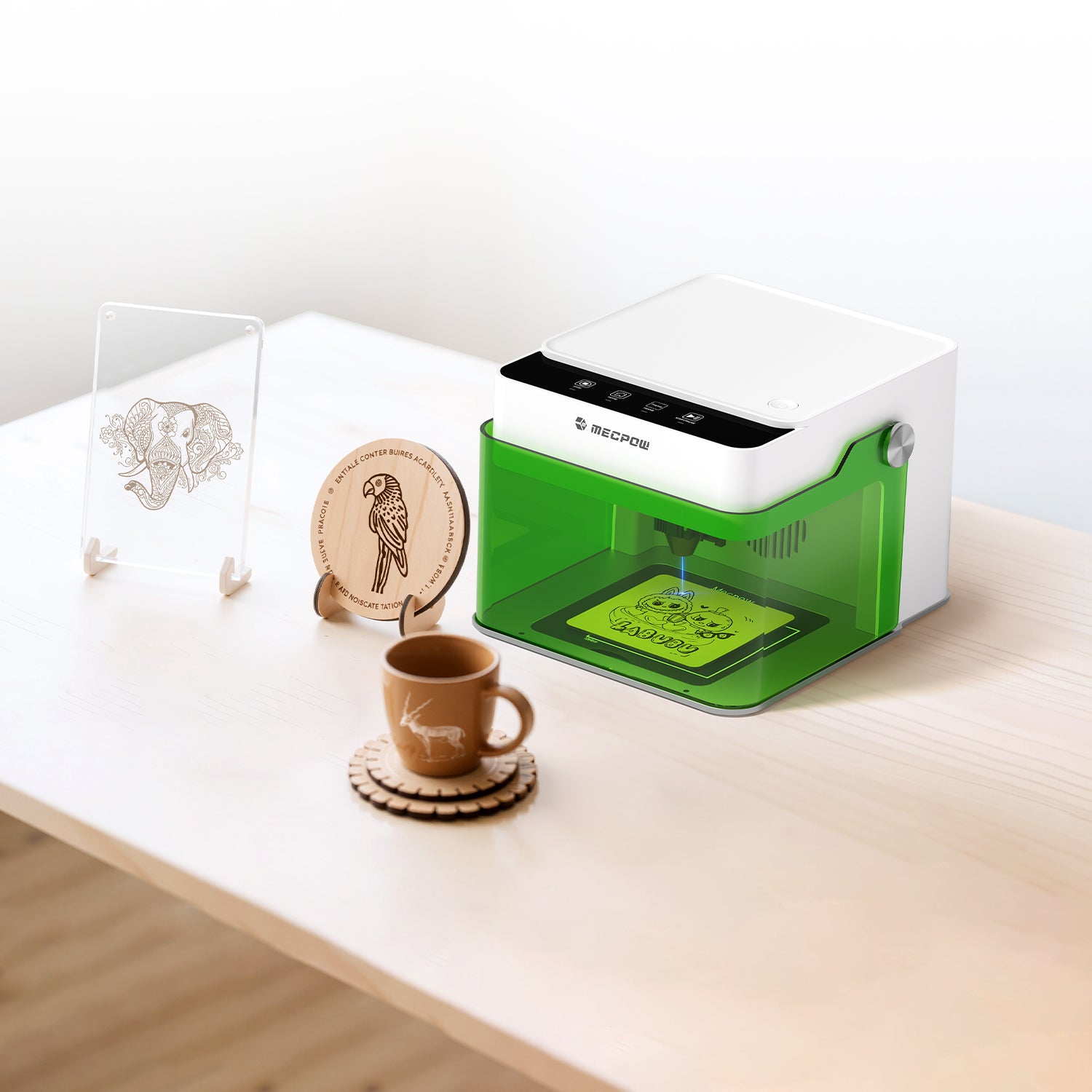
The Mecpow M1 laser engraver isn’t a downsized industrial tool. It’s built specifically as a home DIY laser engraving machine.
1. Entry-Level Pricing That Limits Risk
With pricing starting around $159, the M1 sits squarely in the $200-level beginner range, making it an affordable laser engraving machine for first-time buyers who want to test laser engraving without overcommitting.
2. Compact and Apartment-Friendly
Weighing only 2.4 kg, the Mecpow M1 fits comfortably on desks and shelves. It’s designed for where beginners actually live: apartments, home offices, and shared spaces.
3. Focused on First-Project Success
From safety systems to controls, every design choice supports early wins—helping beginners complete their first engraving without frustration.
Class 1 Safety and Indoor Smoke Control—What That Really Means
This is where the Mecpow laser engraver stands apart from many affordable alternatives.
Fully Enclosed Class 1 Safety Design
The Mecpow M1 is FDA Class 1 certified, using a fully enclosed protective cover that filters 99% of laser light under standard operating conditions.
Key safety features include:
- Safe observation without protective goggles
- Automatic laser shutdown when the lid is opened
- Tilt detection that stops operation if the unit is disturbed
Note: Class 1 safety applies when the machine is used as intended, with the enclosure closed and intact. It significantly reduces risk but does not remove the need for basic awareness—especially if the unit is elevated or the enclosure is compromised.
Smoke-Free Indoor Use with the P50 Air Purifier
No laser engraver is truly indoor-friendly without filtration.
When paired with the optional P50 air purifier, the Mecpow M1 becomes suitable for regular indoor use:
- Filters up to 99.97% of smoke and odors
- No external exhaust hose required
- No window or wall modification needed

The M1 + P50 combination is what enables genuine indoor use. Even so, during long or high-load engraving sessions, basic ventilation—such as opening a window—is still recommended.
Setup, Controls, and Software: What Beginners Should Expect
Pre-Assembled and Ready to Use
The Mecpow M1 arrives fully pre-assembled. There’s no frame construction, belt tuning, or wiring before your first project.
Four physical buttons handle core functions, keeping early operation simple and low-pressure.
Software Compatibility and Learning Curve
The M1 works with widely used laser engraving software:
- LightBurn
- LaserGRBL
- MKSLaser App (mobile)
It supports Windows, macOS, Android, and iOS.
Beginner note: The M1 does not include a built-in camera. Positioning relies on software preview and manual framing, which may take a few practice runs—but this also teaches transferable skills used across most laser engraving machines.
Materials, Projects, and Realistic Capabilities
Material Support (300+ Types)
The Mecpow M1 laser engraver supports engraving on more than 300 materials, covering most common laser engraving supplies used in home DIY projects, including:
- Wood and bamboo
- Leather and faux leather
- Acrylic
- Paper and cardboard
- Stone, ceramic, and coated metals
Metal engraving note: Clean and consistent metal marking requires the optional R1 infrared module. It is suitable for surface marking and light engraving—not deep metal cutting.
Practical Work Area Expectations
The engraving area is approximately 10 × 10 cm (about 4" × 4").
This makes the M1 ideal for small projects such as tags, ornaments, coasters, and personalized DIY gifts, but unsuitable for large signs, door plaques, or oversized boards.
How Projects Typically Progress
- Week 1: Laser engraved wood nameplates, leather tags, simple designs
- Month 1: Acrylic décor and personalized gifts
- Later: Cylindrical engraving or metal marking with add-on modules
Expand Only When Needed
Optional upgrades include:
- Rotary roller for cups and cylindrical objects
- R1 infrared module for metal engraving
- Height risers for thicker materials
The machine grows with your skills—without forcing complexity upfront.
Is Mecpow M1 Worth It for Beginners?
Across many laser engraver reviews, the Mecpow M1 is frequently cited as one of the best laser engravers for beginners—and in real home use, that reputation holds up.
Best Fit For
The Mecpow M1 is ideal for:
- Complete beginners with no prior laser experience
- Home users prioritizing safety and indoor usability
- Apartment dwellers without external exhaust options
- DIY creators focused on small projects and DIY gifts
- Buyers seeking an affordable laser engraver with controlled entry risk

Who Should Look Elsewhere
- Users needing large working areas
- High-volume production workflows
- Deep metal engraving or cutting applications
So, Is the Mecpow M1 Right for You?
If you’re starting from zero and want a laser-safe, smoke-controlled way to explore laser engraving at home, the Mecpow M1 stands out as one of the best laser engravers for beginners.
A beginner-friendly laser engraver isn’t one you outgrow immediately. It’s one that lets you learn comfortably, manage safety risks realistically, and build skills at your own pace—especially when working on home DIY projects, DIY gifts, or laser engraved wood.
Explore the Mecpow M1 laser engraver and see how laser engraving can fit naturally into your home—without smoke, stress, or unnecessary risk.
Want to get inspired—and stand a chance to win free accessories? Join our Instagram community between February 25 and March 16, 2026, and take part in the #MecpowMaker Giveaway.

About Mecpow
Mecpow focuses on making digital creation safe, accessible, and enjoyable for home users.
By prioritizing safety-first design, beginner-friendly workflows, and modular expandability, Mecpow helps more people turn ideas into finished projects—right at their own desk.


Leave a comment
This site is protected by hCaptcha and the hCaptcha Privacy Policy and Terms of Service apply.